Executive Summary: The long-standing belief that Macs are immune to viruses is one of the most dangerous misconceptions in modern cybersecurity. While Apple’s macOS does incorporate robust built-in defenses, the reality is that Mac malware, adware, ransomware, and sophisticated cyber threats are not only real but growing at an accelerating pace. This comprehensive guide debunks the mac virus myth, explains exactly how infections occur, details the warning signs of a compromised system, and provides a battle-tested, layered security strategy — including step-by-step malware removal instructions — to keep your Mac protected in 2025 and beyond.
Do Macs Get Viruses? Debunking the Myth of Apple Immunity
For decades, Mac users have operated under a comforting but increasingly inaccurate assumption: that their Apple computers are inherently safe from the viruses and malware that plague Windows machines. This perception, while rooted in historical reality, has become a critical liability. Understanding mac malware susceptibility today requires separating the origins of this myth from the sobering modern threat landscape.
The Historical Roots of the “Mac Immunity” Myth
The idea that Macs don’t get viruses didn’t emerge from nowhere — it was grounded in a logical, market-driven reality of the early computing era. Three key factors gave birth to this enduring apple security perception:
- Market share economics: Early malware developers were, at their core, pragmatic. Writing malicious code takes time and resources, and targeting the platform used by the vast majority of the world’s computer users — Windows — offered the greatest return on that investment. In the early 2000s, Windows commanded over 95% of the desktop market, making it the overwhelmingly logical target for cybercriminals seeking maximum impact.
- Apple’s controlled ecosystem: Apple’s philosophy of tightly integrating its own hardware and software created a more closed, uniform environment. This architectural consistency meant fewer attack surfaces compared to the sprawling diversity of Windows hardware configurations and third-party software ecosystems, which were notoriously difficult to secure comprehensively.
- Statistical evidence of the era: According to historical cybersecurity analyses, during the early 2000s, Windows systems accounted for well over 99% of all documented malware infections. Viruses like ILOVEYOU (2000), Blaster (2003), and Sasser (2004) infected tens of millions of Windows PCs while Mac users watched from the sidelines, largely unscathed. This created a powerful, experiential reinforcement of the immunity narrative that persisted long after the underlying conditions changed.
The Modern Reality: Macs Are a Growing Target
The comfortable statistical shelter that Mac users once enjoyed has eroded significantly. The modern threat landscape for macOS has transformed dramatically, driven by several converging forces:
- High-value target demographics: Mac’s market share has grown substantially, but more importantly, the profile of Mac users has made them disproportionately attractive to attackers. Creative professionals, executives, financial analysts, and software developers — groups that handle sensitive intellectual property, financial data, and corporate credentials — heavily favor Macs. Attacking one such user can yield far greater returns than compromising dozens of average Windows consumers.
- Rise of Mac-specific malware: Sophisticated, purpose-built Mac threats have emerged with alarming regularity. Silver Sparrow, discovered in 2021, infected nearly 30,000 Macs across 153 countries and was notable for being compiled for Apple’s then-new M1 chip — demonstrating that attackers were actively investing in next-generation Mac malware. OSX.Pirrit is a persistent adware family that has evolved over years to evade detection, injecting ads into browsers and harvesting user data. These are not crude, opportunistic tools — they are engineered threats.
- Expert consensus on the evolving landscape: “The notion that macOS is a safe harbor is obsolete,” noted a principal threat researcher at a leading cybersecurity firm in a 2025 industry briefing. “We are seeing a professionalization of Mac-targeted attacks. Threat actors are investing in macOS-native tooling, and the sophistication of these campaigns now rivals what we see targeting Windows enterprise environments. Mac users who rely solely on the platform’s reputation for security are operating with a false sense of confidence.”
Common Types of Threats Mac Users Face Today
Understanding the specific threat categories that target macOS is the first step in building an effective defense against the mac virus myth that leaves users unprepared:
- Adware and Potentially Unwanted Programs (PUPs): This is the most prevalent category of Mac threats. Adware is typically bundled with free software downloads — a video converter, a PDF editor, a browser extension — and installs silently alongside the desired application. Once installed, it hijacks browser settings, injects advertisements into web pages, tracks browsing behavior, and can slow system performance considerably.
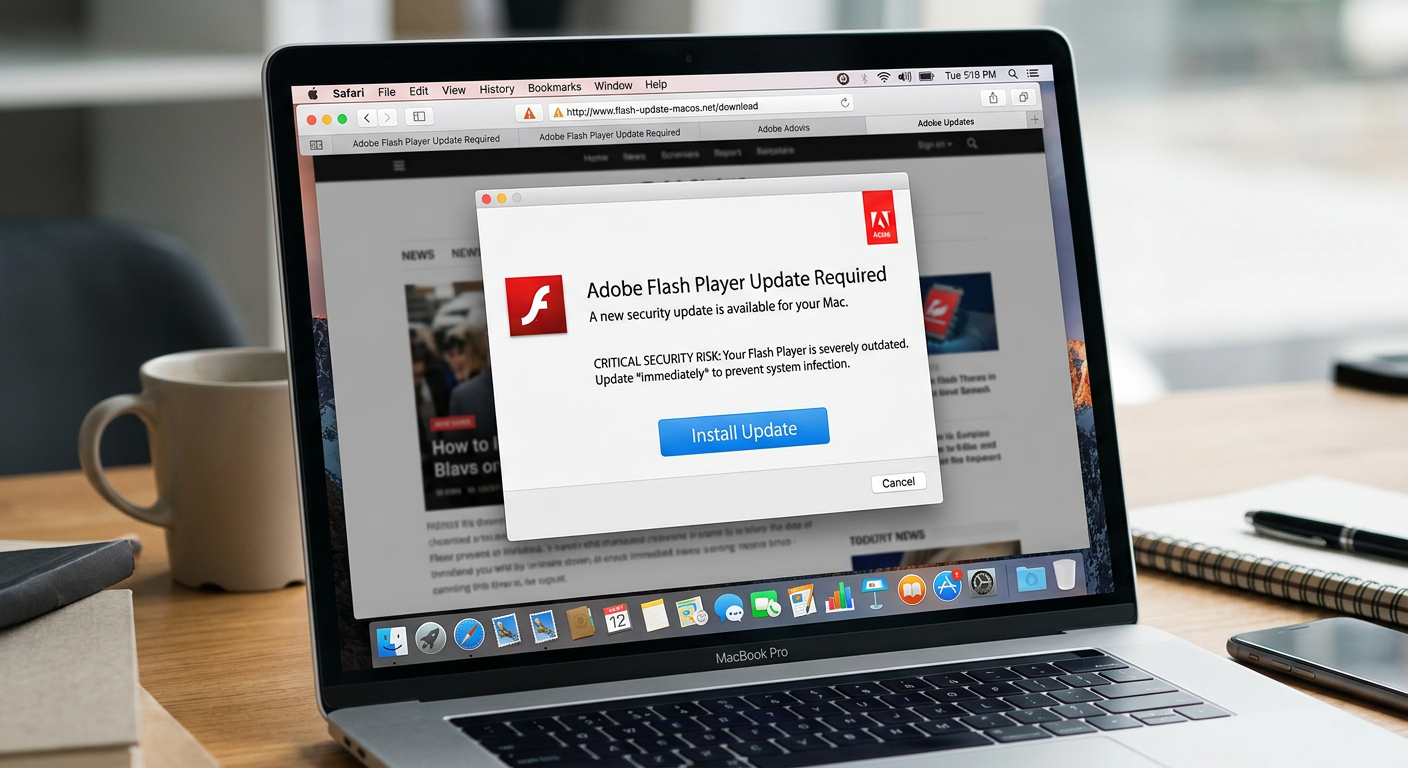
- Trojan viruses disguised as legitimate software: Mac Trojans are among the most insidious threats because they exploit user trust. The most classic example is the fake Adobe Flash Player updater — a prompt that appears in the browser claiming the user needs to update Flash to view content. Clicking “Update” installs malware instead. Similar tactics are used with fake codec installers, counterfeit VPN applications, and spoofed productivity tools.
- Ransomware and Advanced Persistent Threats (APTs): While less common on Macs than Windows, ransomware targeting macOS is a documented and growing reality. KeRanger, the first fully functional Mac ransomware, appeared in 2016 and encrypted user files demanding a Bitcoin ransom. More recently, enterprise-grade APTs — long-term, stealthy intrusion campaigns — have been observed targeting Mac-heavy organizations in the technology and financial sectors, representing a significant escalation in threat sophistication.
How Do Viruses and Malware Infect a Mac? Understanding the Attack Vectors
A critical component of mac security is understanding that infections rarely happen through mysterious, automatic processes. The vast majority of Mac compromises occur through specific, often user-initiated pathways. Knowing these mac attack vectors empowers you to recognize and avoid them before damage is done.
User-Initiated Downloads: The Primary Risk
The single most common pathway for Mac malware delivery is a user voluntarily downloading and installing a malicious file. This category encompasses several distinct scenarios:
- Unofficial and pirated software websites: Downloading applications from sources outside the official Mac App Store or verified developer websites is the highest-risk behavior a Mac user can engage in. Piracy sites, in particular, are notorious for bundling malware with cracked applications. The user believes they are installing Photoshop for free; they are actually installing a keylogger or cryptominer alongside it.
- Fake browser plugin and update prompts: These are among the most effective social engineering attacks targeting Mac users. A website displays a convincing, professional-looking dialog box stating that a required plugin (Flash Player, Java, a video codec) is out of date and must be updated to view the content. The “update” file is, in reality, a malware installer. These prompts are designed to mimic legitimate system notifications closely enough to fool even cautious users.
The image above illustrates a classic malware delivery tactic: a fake update prompt engineered to appear legitimate. If you ever see such a prompt on a website, close the browser tab immediately — do not click anywhere within the dialog.
Social Engineering and Phishing Attacks
Phishing remains one of the most effective and widely deployed attack methods against Mac users, precisely because it bypasses technical defenses entirely by targeting human psychology:
- Malicious links in emails and messages: A carefully crafted email — appearing to come from Apple Support, a bank, a shipping company, or even a colleague — contains a link that leads to either a drive-by download site (which attempts to install malware automatically upon page load) or a credential harvesting page. The sophistication of modern phishing mac attacks means these emails can be extremely convincing, with accurate branding, personalized details, and urgent language designed to override critical thinking.
- Fake Apple ID and login pages: Apple ID credentials are among the most valuable targets for cybercriminals, as they can unlock iCloud data, enable device tracking and wiping, facilitate fraudulent purchases, and serve as a master key to other accounts via “Sign in with Apple.” Fake Apple login pages, hosted on domains with slight misspellings (e.g., “appleid-security.com”), are a persistent and common threat vector specifically targeting Mac and iOS device users.
Exploiting Software Vulnerabilities and Outdated Systems
Even the most cautious user can be compromised if their system software contains unpatched software vulnerabilities:
- Unpatched security flaws: No software is perfect, and macOS is no exception. Apple regularly releases security updates that patch discovered vulnerabilities — flaws in the operating system’s code that, if exploited, allow an attacker to execute malicious code, escalate privileges, or gain unauthorized access to data. Zero-day vulnerabilities (flaws exploited before a patch is available) are particularly dangerous and have been documented targeting macOS in recent years.
- The compounding risk of delayed updates: When Apple releases a security update, it simultaneously publishes the details of the vulnerabilities it patches. This means that users who delay installing updates are now operating on a system with publicly documented, known flaws — making them significantly easier targets. According to a 2025 Cybersecurity Report by a leading threat intelligence firm, systems running outdated operating system versions were 3.5 times more likely to be successfully compromised than those running current software.
What Are the Signs Your Mac Might Have a Virus or Malware?
Early detection is critical to minimizing the damage caused by a Mac infection. Mac malware often manifests through noticeable performance degradation, unexpected behavioral changes, and unauthorized network activity. Recognizing these mac virus symptoms promptly can be the difference between a minor cleanup and a catastrophic data breach.
Performance and System Behavior Anomalies
Your Mac’s performance is one of the most reliable early-warning indicators of a potential infection. Be alert to the following mac performance issues:
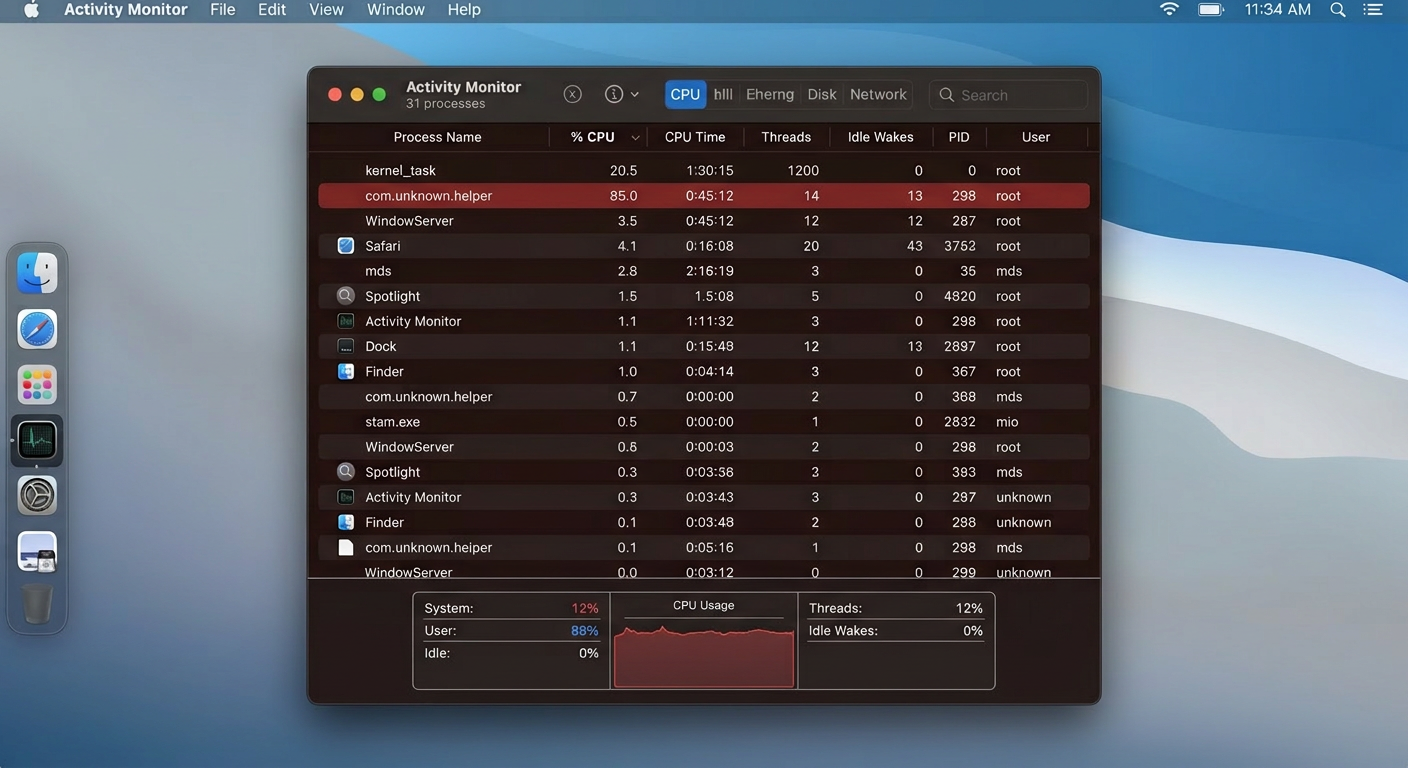
- Unexplained slowdowns and excessive CPU usage: If your Mac suddenly feels sluggish — applications take longer to open, switching between tasks is slow, or the system feels generally unresponsive — and this change occurred without you installing new software or adding significant workloads, it warrants investigation. Malware, particularly cryptominers that use your Mac’s processing power to mine cryptocurrency for an attacker, will cause sustained, high CPU usage even when you are not actively running demanding applications. Open Activity Monitor to check for processes consuming abnormal CPU resources.
- Unusual fan behavior and overheating: Directly related to the above, malicious background processes that peg your CPU or GPU will cause your Mac to generate significantly more heat than normal, triggering the fans to spin at high speed. If your Mac sounds like it is working extremely hard while you are only browsing the web or reading documents, this is a significant red flag that deserves immediate attention.
Unwanted Changes and Unauthorized Activity
Beyond performance, strange mac behavior in the form of unauthorized changes to your system and applications is a strong indicator of compromise:
- Unknown applications in your Applications folder or Login Items: Regularly review the contents of your Applications folder and your Login Items (System Settings > General > Login Items) for applications you do not recognize and did not intentionally install. Malware frequently installs persistence mechanisms — processes that automatically launch when you log in — to ensure it survives reboots. Any unrecognized entry in Login Items should be treated with suspicion.
- Unauthorized browser changes: Browser hijacking is a hallmark of adware and PUP infections. Symptoms include: your default homepage changing to an unfamiliar search engine or website without your action; new browser extensions appearing that you did not install; persistent pop-up advertisements appearing on websites that are normally clean; and search queries being redirected through unfamiliar search engines that inject sponsored results.
- Unusual network traffic and data usage: Malware that exfiltrates data (keyloggers, spyware, data-stealing Trojans) must communicate with its operators over the internet. This generates network traffic that you did not initiate. If you notice significantly higher data usage than normal, or if Activity Monitor’s Network tab shows an unfamiliar process sending or receiving large amounts of data, this is a serious warning sign requiring immediate investigation.
Direct Signs of Specific Malware Types
Certain malware categories leave unmistakable, type-specific indicators that go beyond general system anomalies:
- Ransomware indicators: Ransomware is designed to be noticed — its goal is to extort payment. The clearest signs are files that suddenly cannot be opened, files that have been renamed with unfamiliar extensions appended to their original names (e.g., “report.docx.locked” or “photo.jpg.encrypted”), and the appearance of ransom note files (often named README.txt or DECRYPT_INSTRUCTIONS.html) in folders across your system. If you observe these signs, disconnect from the internet immediately to prevent further encryption and data exfiltration.
- Adware indicators: The defining symptom of an adware infection is an overwhelming and persistent barrage of pop-up advertisements that appear regardless of which website you visit, including websites that would never display such advertising. You may also see new toolbars in your browser, “recommended” software installation prompts appearing frequently, and your browsing experience becoming noticeably slower due to the additional ad content being loaded.
How to Protect Your Mac: A Comprehensive Security Strategy
Effective mac protection in 2025 demands a layered approach. No single tool or habit provides complete coverage; rather, robust security emerges from the combination of Apple’s built-in defenses, disciplined user behavior, and dedicated third-party security software working in concert. This is the foundational principle of layered security architecture.
Leveraging Apple’s Built-in Security Features
Apple has invested significantly in macOS security infrastructure. Understanding and properly configuring these built-in tools is the essential first layer of your defense:
- Gatekeeper and XProtect: Gatekeeper is macOS’s application control mechanism. Ensure it is configured to allow apps only from the App Store and identified developers (System Settings > Privacy & Security). This prevents unsigned, unverified applications from running without explicit user override. XProtect is Apple’s silent, background malware signature database — it automatically checks downloaded files against a list of known malware signatures and blocks identified threats. Crucially, XProtect updates automatically and requires no user action, but it is signature-based and cannot detect novel, unknown threats.
- Prompt macOS updates: As discussed in the attack vectors section, unpatched vulnerabilities are a primary exploitation pathway. Treat macOS security updates as mandatory, time-sensitive actions rather than optional maintenance. Enable automatic updates (System Settings > General > Software Update) to ensure critical patches are applied without delay. According to a 2026 Cybersecurity Report from a leading endpoint security research group, organizations that enforced prompt patching reduced their successful exploitation rate by over 60%.
- Strong passwords and FileVault disk encryption: Use a strong, unique password for your macOS user account — this is your last line of defense if an attacker gains physical access to your machine. Enable FileVault (System Settings > Privacy & Security > FileVault) to encrypt your entire startup disk. If your Mac is lost or stolen, FileVault ensures that your data is cryptographically inaccessible to anyone without your login credentials, preventing physical data theft even if the drive is removed from the machine.
Cultivating Safe User Habits (The Human Firewall)
Technology alone cannot substitute for informed, vigilant behavior. The most sophisticated security software in the world can be circumvented if a user is manipulated into granting it permission to install malware. These mac security best practices form your behavioral defense layer:
- Download software exclusively from trusted sources: The Mac App Store is the safest source for applications, as every app undergoes Apple’s review process. For software not available on the App Store, download only from the official developer’s verified website — navigate there directly by typing the URL rather than clicking a link in an email or advertisement. Never download software from third-party download aggregator sites, torrenting platforms, or any source that is not the original developer.
- Maintain healthy skepticism toward urgency and unsolicited contact: Legitimate software — including macOS itself — does not prompt you to download updates through web browser pop-ups. Apple Support will not call you unsolicited to warn you of a virus. Any communication that creates artificial urgency (“Your Mac is infected! Act NOW!”), demands immediate action, or arrives unexpectedly should be treated as a potential social engineering attempt until proven otherwise. Pause, verify independently, and then act.
- Password manager and two-factor authentication (2FA): A password manager generates and stores strong, unique passwords for every account, eliminating the catastrophic risk of password reuse. If one service is breached, your other accounts remain secure. Pair this with two-factor authentication on all critical accounts — especially your Apple ID, email, and financial accounts. Even if an attacker obtains your password through a phishing attack, 2FA prevents them from accessing the account without the second factor.
The Role of Third-Party Antivirus and Security Software
Apple’s built-in tools provide a valuable foundation, but they have documented limitations — primarily their reliance on known malware signatures and their inability to provide real-time behavioral analysis, phishing link scanning, or proactive threat hunting. This is where dedicated mac antivirus software provides critical additional coverage:
- Capabilities beyond Apple’s built-in tools: A dedicated security suite offers real-time scanning that monitors file system activity as it happens, behavioral analysis that can detect novel malware based on suspicious actions rather than known signatures, active phishing URL blocking that protects you even if you click a malicious link, and network monitoring that can identify suspicious outbound connections indicative of data exfiltration. These capabilities represent a fundamentally different — and complementary — layer of protection to what Apple provides natively.
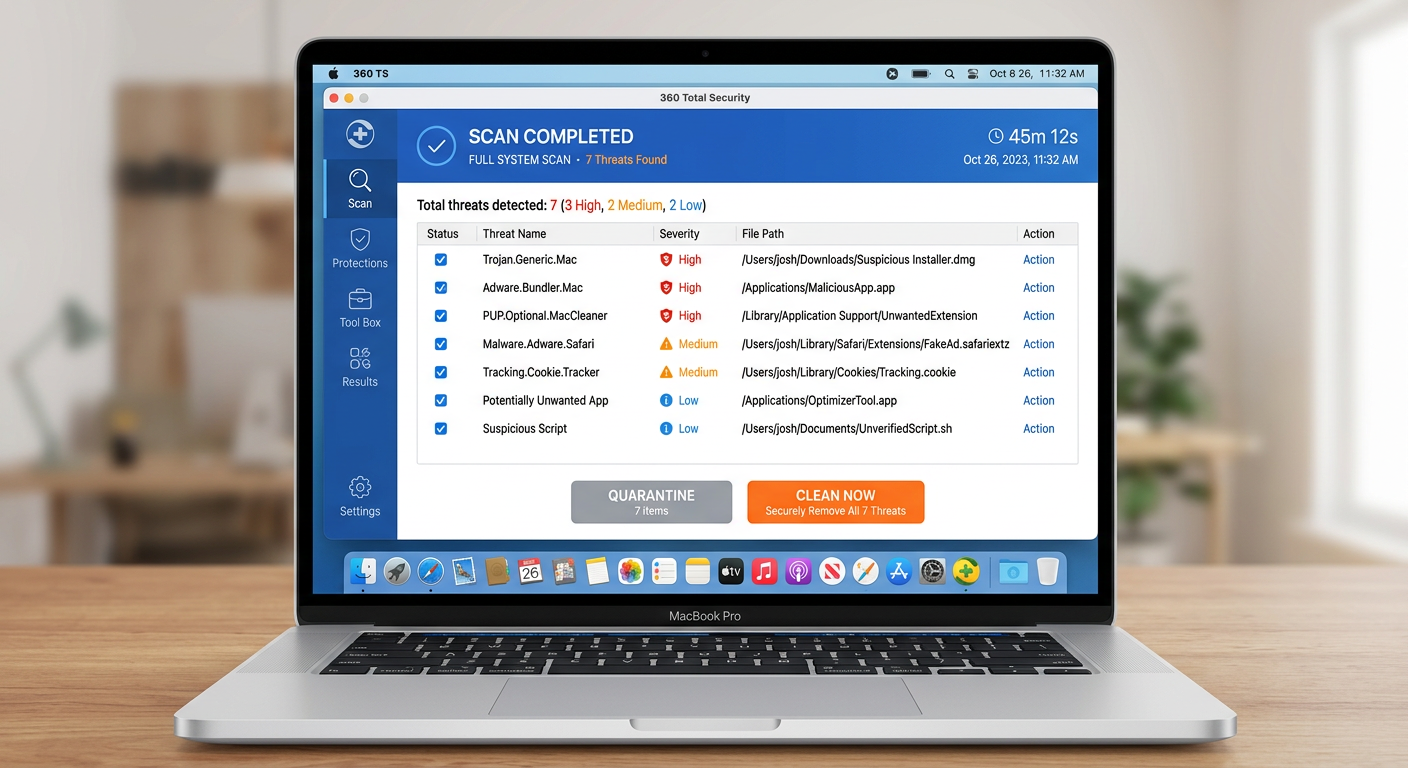
- 360 Total Security for Mac: For users seeking comprehensive, actively maintained protection, 360 Total Security delivers a robust multi-engine real-time virus detection and removal capability specifically tuned for the macOS threat landscape. Its scanning engine identifies Mac-specific malware families — including adware, PUPs, Trojans, and spyware — that XProtect may not yet have signatures for. Beyond pure antivirus protection, its integrated system cleanup tools are particularly valuable for Mac users, as they efficiently identify and remove the adware bundles, browser hijackers, and junk files that represent the most common category of Mac threats. The result is not just a cleaner, safer system, but often a noticeably faster one as well.
The following table provides a clear comparison of the security coverage offered by different protection approaches for macOS:
| Security Feature | Apple Built-in (Gatekeeper + XProtect) | Generic Free Antivirus | 360 Total Security |
|---|---|---|---|
| Known Malware Signature Detection | ✅ Yes (Apple-curated database) | ✅ Yes | ✅ Yes (Multi-engine) |
| Real-Time File System Scanning | ⚠️ Limited (on-download only) | ✅ Yes | ✅ Yes (Continuous) |
| Behavioral / Heuristic Analysis | ❌ No | ⚠️ Basic | ✅ Yes (Advanced) |
| Phishing URL Protection | ❌ No | ⚠️ Limited | ✅ Yes |
| Adware & PUP Removal | ⚠️ Limited | ⚠️ Basic | ✅ Yes (Dedicated Engine) |
| System Cleanup & Optimization | ❌ No | ❌ No | ✅ Yes (Integrated Tools) |
| Browser Hijacker Detection | ❌ No | ⚠️ Limited | ✅ Yes |
| Automatic Threat Database Updates | ✅ Yes (via macOS updates) | ✅ Yes | ✅ Yes (Cloud-based) |
发表回复