Executive Summary
Trojan viruses represent one of the most dangerous and deceptive categories of malware in the modern cybersecurity landscape. Unlike self-replicating viruses or network-spreading worms, Trojans exploit the most vulnerable component of any security system: human trust. This comprehensive guide answers every critical question about Trojan virus threats — what they are, how to recognize an active infection, how to remove them systematically, and most importantly, how to build a multi-layered defense that stops them before they ever gain a foothold. Whether you are a home user, a small business owner, or an IT professional, understanding Trojan malware is no longer optional. By the end of this guide, you will have the knowledge and the tools — including 360 Total Security — to protect your digital life with confidence.
What Exactly Is a Trojan Virus and How Does It Differ from Other Malware?
A Trojan virus is a deceptive type of malware that masquerades as legitimate software to trick users into installing it, fundamentally differing from other malware in its method of delivery and its complete reliance on user action. The term originates from the ancient Greek myth of the Trojan Horse — a seemingly innocent gift that concealed an army of soldiers within. In the digital world, the concept is identical: something that appears harmless or even desirable conceals a malicious payload designed to compromise your system, steal your data, or hand control of your machine to a remote attacker.
The Deceptive Nature of Trojans: Social Engineering in Action
The defining characteristic of a Trojan is its reliance on social engineering — the art of psychologically manipulating people into performing actions or divulging confidential information. A Trojan does not spread on its own. It needs you to invite it in.
Common delivery vectors include:
- Fake software updates: Pop-ups claiming your Flash Player, Java, or browser is critically out of date and urging you to download an “update” that is actually a Trojan installer.
- Pirated software and cracked games: Illegal copies of premium software or games are among the most prolific Trojan carriers on the internet. The “crack” that bypasses license verification often doubles as a malware installer.
- Malicious email attachments: A PDF invoice, a Word document with macros, or a ZIP file that appears to come from a trusted source but executes a Trojan upon opening.
- Fake streaming or download sites: Sites offering free movies, music, or software that bundle Trojans with the downloaded content.
According to a 2024 threat intelligence report by a leading cybersecurity research firm, social engineering-based delivery methods accounted for over 67% of all successful malware installations, with Trojans disguised as legitimate software being the dominant attack vector. This underscores a critical truth: the most sophisticated firewall in the world can be bypassed the moment a user willingly downloads and executes a malicious file.
Key Differences: Trojans vs. Viruses vs. Worms vs. Ransomware
One of the most common sources of confusion in cybersecurity is the interchangeable use of terms like “virus,” “Trojan,” and “malware.” While all Trojans are malware, not all malware is a Trojan. Understanding the distinctions is essential for choosing the right protective measures.
- Virus: Attaches itself to clean, legitimate files and spreads when those files are shared or executed. It requires a host file to propagate and can infect other files on the same system or across networks when files are transferred.
- Trojan: Disguises itself as legitimate software and does not self-replicate. It relies entirely on user deception to gain entry. Once inside, it executes its payload independently.
- Worm: A self-contained program that replicates and spreads automatically across networks, exploiting vulnerabilities without requiring any user interaction. Worms can cause massive network disruption through sheer volume of replication.
- Ransomware: Encrypts the victim’s files and demands a ransom payment for the decryption key. Critically, ransomware is very frequently delivered by a Trojan — the Trojan gains access first, then downloads and executes the ransomware payload.
- Spyware/Adware: Often delivered via Trojans, these programs monitor user activity, harvest data, or bombard users with unwanted advertisements.
| Malware Type | Propagation Method | Primary Intent | User Interaction Required |
|---|---|---|---|
| Trojan | Social engineering / deception | Backdoor access, data theft, payload delivery | Yes — user must execute the file |
| Virus | Attaches to host files, spreads on file transfer | File corruption, system damage, spreading | Partial — host file must be executed |
| Worm | Self-replicating across networks autonomously | Network disruption, resource consumption | No — fully autonomous propagation |
| Ransomware | Often delivered via Trojan or phishing | Extortion via file encryption | Yes — initially (via Trojan delivery) |
| Spyware | Bundled software, drive-by downloads | Data harvesting, surveillance | Often yes — via deceptive install |
The Common Payloads: What Does a Trojan Do Once Inside?
The term “Trojan” describes the delivery mechanism, not the payload. Once a Trojan successfully infiltrates a system, it can execute a wide variety of malicious functions depending on its programming. The most dangerous payloads include:
- Backdoor Creation: The Trojan opens a hidden communication channel — a “backdoor” — that allows a remote attacker to access and control your PC at will. This is the foundation of Remote Access Trojans (RATs), which can give hackers full control over your webcam, microphone, files, and keyboard.
- Credential and Data Theft: Keylogger Trojans silently record every keystroke you make, capturing banking passwords, email logins, social security numbers, and credit card details. This data is then transmitted to the attacker’s server.
- Botnet Recruitment: Your infected machine may be silently conscripted into a botnet — a network of thousands of compromised computers used to launch Distributed Denial of Service (DDoS) attacks, send spam, or mine cryptocurrency, all without your knowledge.
- Dropper/Downloader Function: Many Trojans act as a first-stage infection, silently downloading and installing additional, more sophisticated malware — including ransomware, rootkits, or banking trojans — once they have established a foothold.
How Can You Tell If Your Computer Is Infected with a Trojan?
Recognizing the subtle yet persistent symptoms of a Trojan infection is crucial for early detection and damage mitigation. These threats are specifically engineered to operate stealthily — the longer they go undetected, the more damage they can cause and the more data they can steal. Knowing the warning signs can be the difference between a minor incident and a catastrophic breach.
Performance and System Anomalies: The Red Flags
Trojans consume system resources to execute their payloads, communicate with command-and-control servers, and perform background operations. This often manifests as noticeable performance degradation:
- Unexplained slowdowns and high resource usage: If your CPU or memory usage is consistently high when you are not running demanding applications, a background process may be using your resources for malicious purposes such as cryptocurrency mining or sending spam.
- Frequent crashes or system instability: Trojans that interfere with system processes or install poorly written malware can cause application crashes, Blue Screens of Death (BSODs), or unexpected reboots.
- Unknown programs in startup or new browser extensions: Check your startup programs (via Task Manager > Startup tab on Windows). If you see programs you did not install launching automatically, this is a significant red flag. Similarly, browser toolbars or extensions you did not add are classic signs of adware delivered by a Trojan.
- Disabled or malfunctioning security software: Some sophisticated Trojans specifically target and disable antivirus software or Windows Defender to prevent detection. If your security software is suddenly turned off and you cannot re-enable it, treat this as a critical emergency indicator.
Network and Security Warning Signs
Because most Trojans need to communicate with their operators or exfiltrate stolen data, network-related anomalies are among the most reliable indicators of an active infection:
- Unusual network activity or data usage: If your internet connection feels sluggish or your monthly data usage has spiked without a clear explanation, a Trojan may be using your bandwidth to send data, participate in a botnet, or download additional malware.
- Friends reporting strange messages from your accounts: If contacts tell you they are receiving unusual emails, social media messages, or chat requests from you — especially messages containing links or requests for money — your credentials have almost certainly been stolen by a credential-harvesting Trojan.
- Browser hijacking symptoms: Unwanted pop-up advertisements, automatic redirects to unfamiliar websites, a changed browser homepage, or a replaced default search engine are all hallmarks of browser-hijacking malware, frequently delivered by Trojans.
- Inability to access security websites: Some Trojans modify the Windows hosts file or DNS settings to block access to antivirus vendor websites, preventing you from downloading removal tools or updates.
Proactive Detection: Using Tools to Find Hidden Threats
Relying solely on visible symptoms is a reactive approach. Proactive detection using the right tools is far more effective at catching Trojans before they cause significant damage.
- Behavioral and heuristic antivirus analysis: Traditional signature-based antivirus can only detect known threats. A robust security solution like 360 Total Security employs heuristic and behavioral analysis engines that monitor how programs behave in real time. If a newly downloaded file attempts to modify system registry keys, disable security processes, or establish a hidden network connection — behaviors typical of Trojans — it will be flagged and blocked even if its specific signature has never been seen before. This is critical protection against zero-day Trojans.
- Windows Task Manager and Resource Monitor: Press Ctrl + Shift + Esc to open Task Manager and examine the Processes tab for anything consuming unusual CPU or memory resources. Right-click suspicious processes and select “Search online” to research them. Use Resource Monitor (search for it in the Start menu) and navigate to the Network tab to see exactly which processes are making network connections and to which IP addresses — a powerful way to spot Trojans communicating with remote servers.
- Scheduled deep scans: Configure your security software to run comprehensive full-system scans at least once a week during off-peak hours. Many Trojans are designed to evade quick or on-demand scans but are caught during thorough deep scans that examine every file and process.
What Are the Most Effective Strategies for Proactive Trojan Virus Protection?
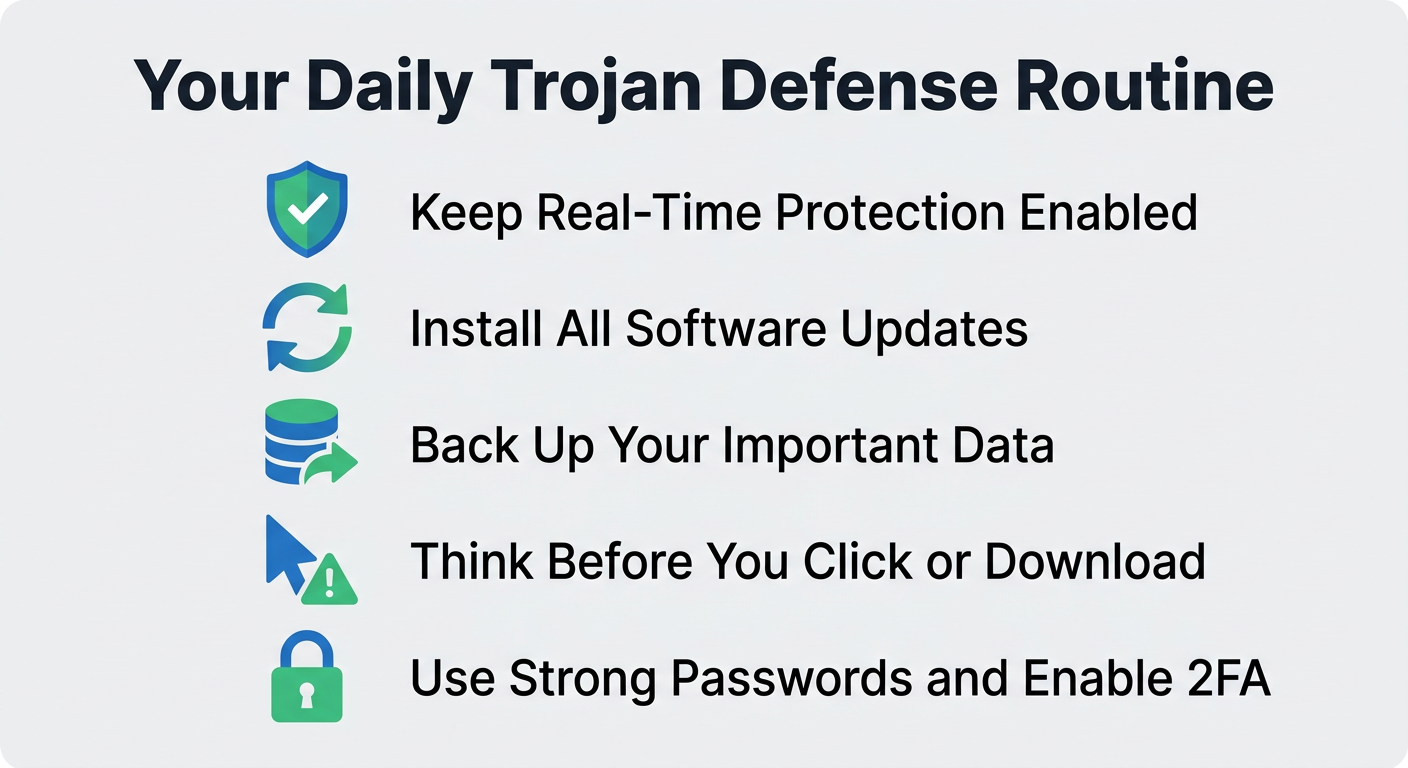
Prevention is exponentially more effective than remediation when it comes to Trojan viruses. A multi-layered defense strategy — combining reliable security software, cultivated user habits, and disciplined system maintenance — is the only approach that provides genuinely robust protection. No single tool or behavior is sufficient on its own; the layers must work together.
The First Layer: Choosing and Configuring Robust Security Software
Your security software is your primary automated defense. Choosing the right solution and configuring it correctly is the single most impactful step you can take:
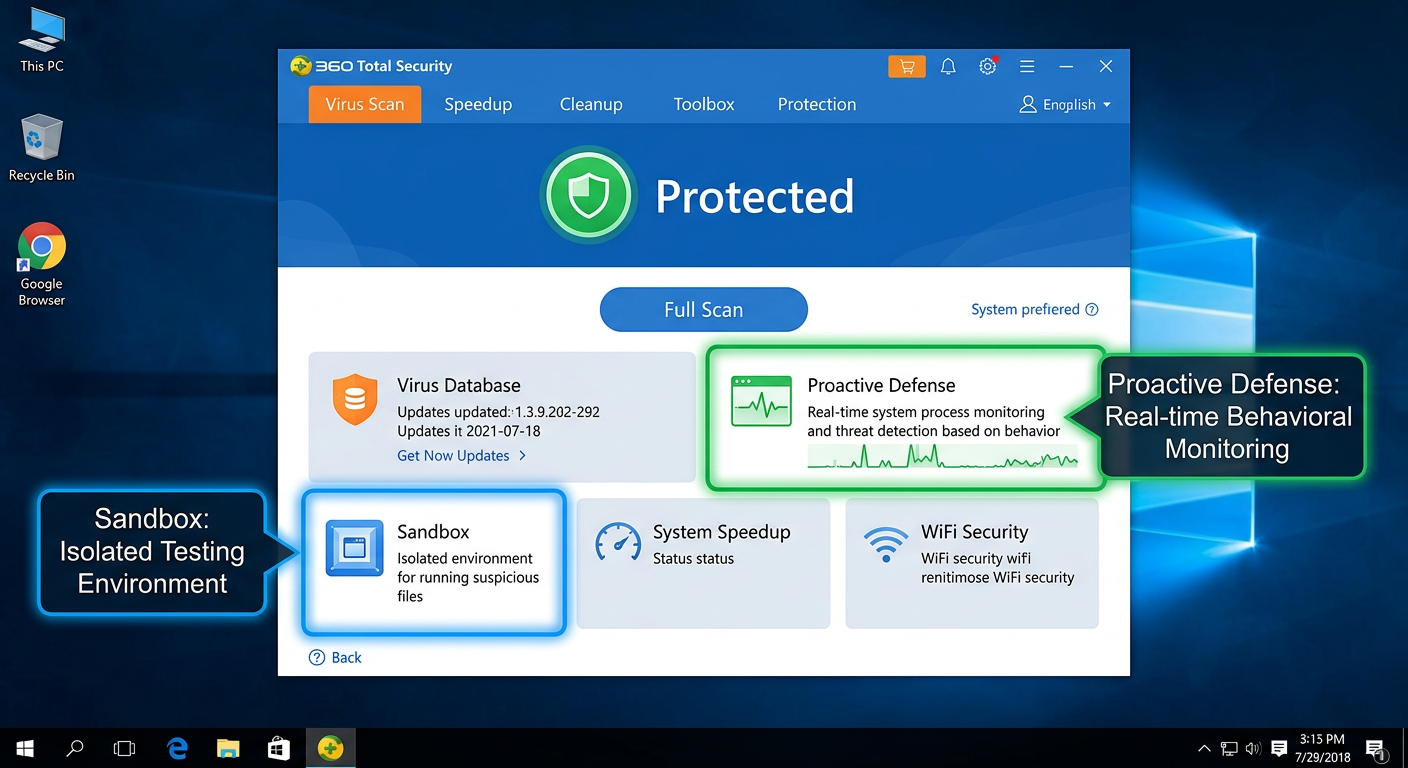
- Use a comprehensive security suite: Look for a solution that integrates real-time antivirus scanning, a two-way firewall, and behavioral/heuristic protection. 360 Total Security excels in this regard by combining multiple detection engines — including the industry-respected Bitdefender engine and 360’s own cloud AI engine — with a proactive defense system that monitors program behavior in real time to block actions typical of Trojan activity.
- Always keep real-time protection enabled: Never disable real-time scanning, even temporarily. Schedule automatic deep scans on a weekly basis. According to independent testing by AV-TEST, comprehensive security suites employing multi-engine approaches consistently achieve protection rates exceeding 99% against prevalent Trojan families, compared to significantly lower rates for single-engine solutions.
- Leverage sandbox technology: If you regularly need to run software from unknown or untrusted sources, a sandbox environment is invaluable. 360 Total Security includes a built-in Sandbox feature that allows you to execute suspicious programs in a completely isolated virtual environment. Any Trojan payload is contained within the sandbox and cannot touch your real system files, registry, or network connections.
The Human Firewall: Cultivating Safe Digital Habits
Technology can only do so much. Because Trojans fundamentally rely on deceiving humans, developing security-conscious habits is an irreplaceable layer of defense:
- Treat all unsolicited communications with suspicion: Be extremely cautious with email attachments and links, even when they appear to come from known contacts. Trojans frequently use stolen contact lists to send convincing phishing emails. Always verify the sender’s actual email address (not just the display name) and when in doubt, contact the sender through a separate channel to confirm they actually sent the message.
- Download software exclusively from official sources: Only obtain software from the developer’s official website or reputable, established app stores (Microsoft Store, Apple App Store). Avoid cracks, keygens, serial number generators, and pirated software at all costs — these are among the most prolific Trojan distribution mechanisms in existence. The money saved on a software license is never worth the risk of a catastrophic data breach.
- Be skeptical of urgency-based pop-ups: Legitimate software companies do not deliver critical security updates through browser pop-ups. If a website tells you that your Flash Player, Java, video codec, or browser is critically out of date and you must update immediately, close the tab. Navigate directly to the software vendor’s official website to check for updates independently.
- Verify file extensions: Enable the display of file extensions in Windows Explorer (View > Show > File name extensions). A file named “invoice.pdf.exe” is not a PDF — it is an executable program. Trojans frequently use this trick to disguise themselves.
The Maintenance Layer: Keeping Your Digital House in Order
Proactive system maintenance closes the security gaps that Trojans exploit and limits the damage they can cause if they do get through:
- Apply updates religiously: The majority of successful Trojan infections that exploit software vulnerabilities target known flaws for which patches already exist. Update your operating system, web browsers, browser plugins, and all installed applications as soon as updates become available. Enable automatic updates wherever possible. Uninstall software you no longer use — every installed program is a potential attack surface.
- Use strong, unique passwords with two-factor authentication: If a credential-stealing Trojan does capture one of your passwords, using unique passwords for every account limits the damage to that single account. Enable two-factor authentication (2FA) on all critical accounts — email, banking, social media — so that even a stolen password cannot grant access without the second factor.
- Maintain regular, tested backups: Back up your important data regularly to both an external hard drive (disconnected from your PC when not in use) and a reputable cloud backup service. Test your backups periodically to ensure they can actually be restored. This is your ultimate recovery safety net — not just against Trojans, but against ransomware, hardware failure, and accidental deletion.
Step-by-Step Guide: How to Remove a Trojan Virus from Your Infected PC
If you suspect or have confirmed a Trojan infection, remain calm but act decisively. Successful Trojan removal requires a systematic approach. Rushing or skipping steps can leave remnants of the infection that allow it to re-establish itself. Follow this process carefully.
Immediate First Response: Isolate and Assess
Your first priority is to prevent the Trojan from doing any more damage while you work on removing it:
- Step 1 — Disconnect from the Internet immediately: Physically unplug your Ethernet cable from the router or disable Wi-Fi. This critical step cuts off the Trojan’s ability to exfiltrate your data to remote servers, receive new commands from its operators, or download additional malware. Do this before anything else.
- Step 2 — Boot into Safe Mode with Networking: Restart your computer and boot into Safe Mode with Networking. In Windows 10/11, hold Shift while clicking Restart, then navigate to Troubleshoot > Advanced Options > Startup Settings > Restart, and press F5. Safe Mode loads Windows with only the most essential drivers and services, which prevents the vast majority of Trojans from starting automatically. This gives your removal tools a significant advantage. “With Networking” allows you to download updated definitions if needed.
- Step 3 — Document what you know: Note any suspicious program names you have seen in Task Manager, any recent downloads that may have triggered the infection, and exactly what symptoms you are experiencing. This information will be useful for targeted removal.
The Core Removal Process Using Security Software
With the system isolated and in Safe Mode, you can now attack the infection directly:
- Step 4 — Run a full system scan with your primary security software: Launch your installed antivirus and initiate the most comprehensive scan available. For users of 360 Total Security, use the “Full Scan” feature, which performs a deep examination of all files, processes, and registry entries. Additionally, use the built-in “System Repair” feature, which is specifically designed to identify and restore system settings that have been altered by malware — such as modified hosts files, disabled Windows Defender, or corrupted system files.
- Step 5 — Use the built-in process killer for stubborn threats: Some Trojans inject themselves into legitimate system processes, making them difficult to terminate and remove while running. 360 Total Security includes a dedicated “Trojan Killer” tool designed to forcibly terminate and remove these deeply embedded threats. Use this tool if the standard scan identifies infections it cannot automatically clean.
- Step 6 — Run a second-opinion scan: No single security tool catches everything. After your primary scan, use a complementary second-opinion scanner such as Malwarebytes Free to perform an additional scan. Running two different tools significantly increases the probability of catching every component of the infection.
| Symptom / Situation | Recommended Action | Priority |
|---|---|---|
| Suspected infection — no confirmation yet | Run a Full Scan with 360 Total Security in normal mode | Immediate |
| Cannot run antivirus software | Boot into Safe Mode with Networking, then run scan | Immediate |
| Cannot access antivirus vendor website | Check Windows hosts file for tampering; use a mobile device to download tools | High |
| Antivirus detects but cannot remove infection | Use 360 Total Security Trojan Killer; run second-opinion scanner (Malwarebytes) | High |
| Infection persists after multiple scans | Consider System Restore to a pre-infection point, or full OS reinstall | High |
| Rootkit suspected (infection survives reboots) | Use a bootable rescue disk scanner (offline scan environment) | Critical |
Post-Removal Cleanup and Verification
Removing the Trojan executable is necessary but not sufficient. A thorough cleanup ensures no residual damage or access points remain:
- Step 7 — Clean browsers and reset settings: Open each browser you use and clear all cookies, cached data, and browsing history. Navigate to browser settings and reset your homepage and default search engine to your preferred choices. Remove any browser extensions you do not recognize.
- Step 8 — Change all sensitive passwords from a clean device: Assume that any passwords you typed on the infected machine may have been captured. From a separate, clean device (a smartphone or a computer you know is uninfected), change the passwords for all critical accounts: email, online banking, social media, cloud storage, and any accounts where you store payment information. Enable 2FA on all of them if you have not already.
- Step 9 — Monitor closely and verify: Over the following weeks, monitor your system for any recurrence of symptoms. Check your financial statements and credit card transactions for any unauthorized activity. If you had sensitive files on the infected machine, consider whether you need to take additional steps such as notifying your bank or placing a fraud alert with credit bureaus.
- Step 10 — Consider a full reinstall for severe infections: If the infection was particularly severe, if you have reason to believe a rootkit was installed, or if symptoms persist despite thorough scanning, the only way to guarantee a completely clean system is to perform a full operating system reinstall after backing up your personal files (scan them before restoring).
Why 360 Total Security Is a Top Choice for Comprehensive Trojan Defense
360 Total Security provides a uniquely powerful and accessible defense suite against Trojan viruses by combining best-in-class multi-engine virus detection with proactive behavioral analysis, sandbox isolation, and integrated system optimization tools — all in a single, user-friendly package available at no cost for essential protection.
Multi-Engine Defense: Doubling Down on Detection
The most fundamental measure of an antivirus product is its ability to actually detect threats. 360 Total Security takes a multi-engine approach that provides coverage that no single-engine solution can match:
- Dual Antivirus Engine Architecture: At its core, 360 Total Security integrates the powerful Bitdefender engine — consistently ranked among the top performers in independent lab tests by organizations like AV-TEST and AV-Comparatives — for signature-based detection of known Trojan families, alongside 360’s own proprietary AI engine for heuristic and behavioral detection of new and evolving threats. This dual-engine approach provides a detection safety net where threats that evade one engine are caught by the other.
- 360 Cloud Engine: Leverages real-time collective intelligence from 360’s massive global user base. When a new Trojan is identified anywhere in the world, threat intelligence is pushed to the cloud and all protected users receive updated protection within minutes — far faster than traditional signature update cycles. According to independent security evaluations, this cloud-assisted approach dramatically reduces the window of vulnerability to emerging Trojan variants. As one technology reviewer noted: “For a free product, its detection rates compete with paid suites, especially against prevalent threats like downloaders and backdoor Trojans — the cloud engine is a genuine differentiator.”
Proactive and Behavioral Protection Layers
Detection of known threats is necessary but not sufficient in today’s threat landscape, where new Trojans are created and released daily. 360 Total Security addresses this with proactive, behavior-based protection layers:
- Proactive Defense System: Rather than waiting to identify a file as malicious by its signature, the Proactive Defense module monitors the behavior of all running programs in real time. If a program attempts to perform actions characteristic of Trojan activity — such as modifying critical system registry keys, injecting code into other processes, disabling security software, or establishing connections to known command-and-control server addresses — it is immediately flagged, blocked, and quarantined, regardless of whether its specific signature is in the database.
- Sandbox Technology: The integrated Sandbox feature allows you to launch any suspicious or unknown application in a completely isolated virtual environment that is sealed off from your real operating system. The sandboxed program can run and reveal its true behavior — including any Trojan payload it carries — without being able to write to your real file system, modify your registry, access your real network connections, or interact with other running processes. This is an invaluable tool for safely evaluating software from untrusted sources.
Beyond Protection: Integrated Optimization for a Healthier PC
One of the most persistent myths in consumer security is that strong antivirus protection inevitably slows down your computer. 360 Total Security directly challenges this assumption:
- System optimization and cleanup tools: Trojans frequently degrade system performance as a side effect of their operations — consuming CPU cycles, filling disk space with downloaded malware, and adding entries to startup programs. 360 Total Security includes comprehensive cleanup tools that remove junk files, temporary data, and unnecessary startup items. Critically, it also includes a vulnerability scanner that identifies unpatched software on your system — closing the security gaps that Trojans most commonly exploit for initial entry.
- Resource-aware operation modes: The software includes dedicated “Driving Mode” and “Game Mode” profiles that intelligently manage resource allocation, ensuring that protection processes run efficiently in the background without competing with your active applications. Scans and updates are deferred during intensive tasks and completed during idle periods, providing full protection without perceptible performance impact during your work or gaming sessions.
For anyone serious about comprehensive Trojan defense without compromising system performance or budget, 360 Total Security represents an exceptional value proposition. Visit the official website to download and begin protecting your system today.
Frequently Asked Questions About Trojan Viruses
Q1: Can a Trojan virus infect my phone or tablet, or only my PC?
Yes, Trojans absolutely target mobile devices. Android devices are particularly susceptible, as Trojans are commonly distributed through third-party app stores outside of the Google Play Store, disguised as popular games, utility apps, or fake versions of legitimate applications. iOS devices are less frequently targeted due to Apple’s strict App Store review process and sandboxed app architecture, but jailbroken iPhones are significantly more vulnerable. Mobile Trojans can steal contacts, messages, banking credentials, and even intercept SMS-based two-factor authentication codes.
Q2: If my antivirus software is up to date, am I completely safe from Trojans?
Up-to-date antivirus software is an essential and powerful layer of defense, but it does not provide absolute, 100% guaranteed protection on its own. Zero-day Trojans — newly created malware for which no signature yet exists — can sometimes evade signature-based detection before the antivirus vendor has had time to analyze and update their databases. This is why behavioral and heuristic detection (as offered by 360 Total Security) is so important. Combining robust antivirus with safe browsing habits, regular software updates, and skepticism toward unsolicited downloads provides the most comprehensive protection.
Q3: How long can a Trojan stay undetected on my computer?
This varies enormously depending on the sophistication of the Trojan and the quality of the security software installed. Some simple Trojans are detected within minutes or hours. However, advanced persistent Trojans — particularly those used in targeted attacks against businesses or high-value individuals — are specifically engineered for stealth and can remain undetected for months or even years. According to a 2026 Cybersecurity Report by a leading threat intelligence organization, the average dwell time of advanced malware in enterprise environments before detection was measured in weeks to months, highlighting the critical importance of behavioral monitoring rather than relying solely on periodic scans.
Q4: Is it safe to pay the ransom if a Trojan delivered ransomware and encrypted my files?
Cybersecurity experts and law enforcement agencies universally advise against paying ransoms. Payment does not guarantee that you will receive a working decryption key. It directly funds criminal organizations, encouraging further attacks. It may also mark you as a willing payer, making you a target for future attacks. Instead, report the incident to your local law enforcement and check resources like the No More Ransom project (nomoreransom.org), which provides free decryption tools for many known ransomware families. This is why maintaining regular, offline backups is so critical — they provide a recovery path that makes the ransom demand irrelevant.
Q5: After removing a Trojan, do I need to reinstall Windows, or is a successful scan enough?
In the majority of cases, a thorough removal process using quality security tools — including scanning in Safe Mode, using a second-opinion scanner, and performing post-removal cleanup — is sufficient to fully remediate a Trojan infection. However, a full OS reinstall is the recommended course of action in specific scenarios: if the Trojan installed a rootkit (which can hide itself from the operating system itself), if symptoms persist after multiple thorough scans, if the infection involved a sophisticated Remote Access Trojan that may have been active for an extended period, or if the machine stores extremely sensitive data and you need absolute certainty. When in doubt, a clean reinstall is always the safest option.
Author Bio: This article was written and reviewed by the 360 Total Security Cybersecurity Research Team, a group of dedicated security analysts and technical writers specializing in malware analysis, threat intelligence, and consumer cybersecurity education. The team contributes regularly to cybersecurity awareness initiatives and maintains the 360 Total Security knowledge base with up-to-date guidance on emerging threats and best practices for digital protection.
发表回复