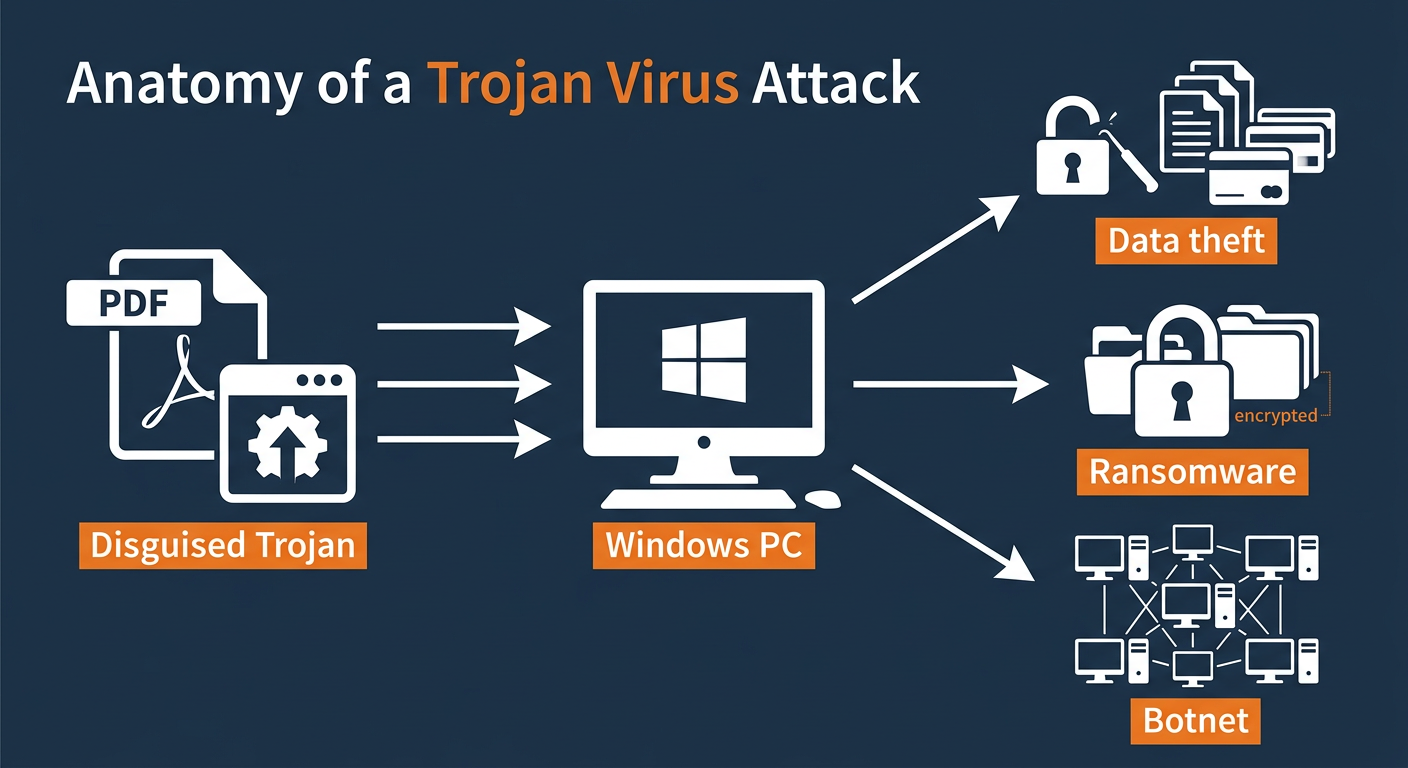
Executive Summary: Trojan viruses represent one of the most sophisticated and damaging categories of malware in the modern cybersecurity landscape. Unlike self-replicating viruses or worms, a trojan virus disguises itself as legitimate software to trick users into voluntary installation, after which it silently executes destructive payloads—ranging from credential theft and ransomware deployment to full system backdoor creation. This comprehensive guide covers everything you need to know about trojan virus definition, how trojans evade detection, proactive prevention strategies, deep-scan removal methods, and post-infection recovery steps. Whether you are a home user or IT professional, understanding the full lifecycle of a trojan attack is the first step toward building an impenetrable defense for your Windows or macOS desktop.
What Makes Trojan Viruses So Dangerous and Hard to Detect?
The defining characteristic of a trojan virus is its extraordinary capacity for deception. While a traditional virus announces its presence through immediate system disruption, a trojan is engineered for patience and stealth. It exploits the most fundamental vulnerability in any security chain: human trust. By masquerading as something benign—a utility tool, a game installer, a productivity app—it bypasses both user suspicion and many conventional security scans, delivering its malicious payload long after it has established a firm foothold in the system. Understanding this deceptive architecture is critical to appreciating why trojans consistently rank among the most reported and most damaging forms of malware globally.
The Art of Deception: How Trojans Mimic Legitimate Files
Trojans are masterful impersonators. Their developers invest significant effort into making them appear indistinguishable from genuine software. This mimicry operates on multiple levels simultaneously, making them particularly difficult for the average user to identify without specialized tools.
- Icon and filename spoofing: A trojan may adopt the exact icon of a well-known application—such as Adobe Reader, VLC Media Player, or a Windows system utility—combined with a plausible filename like
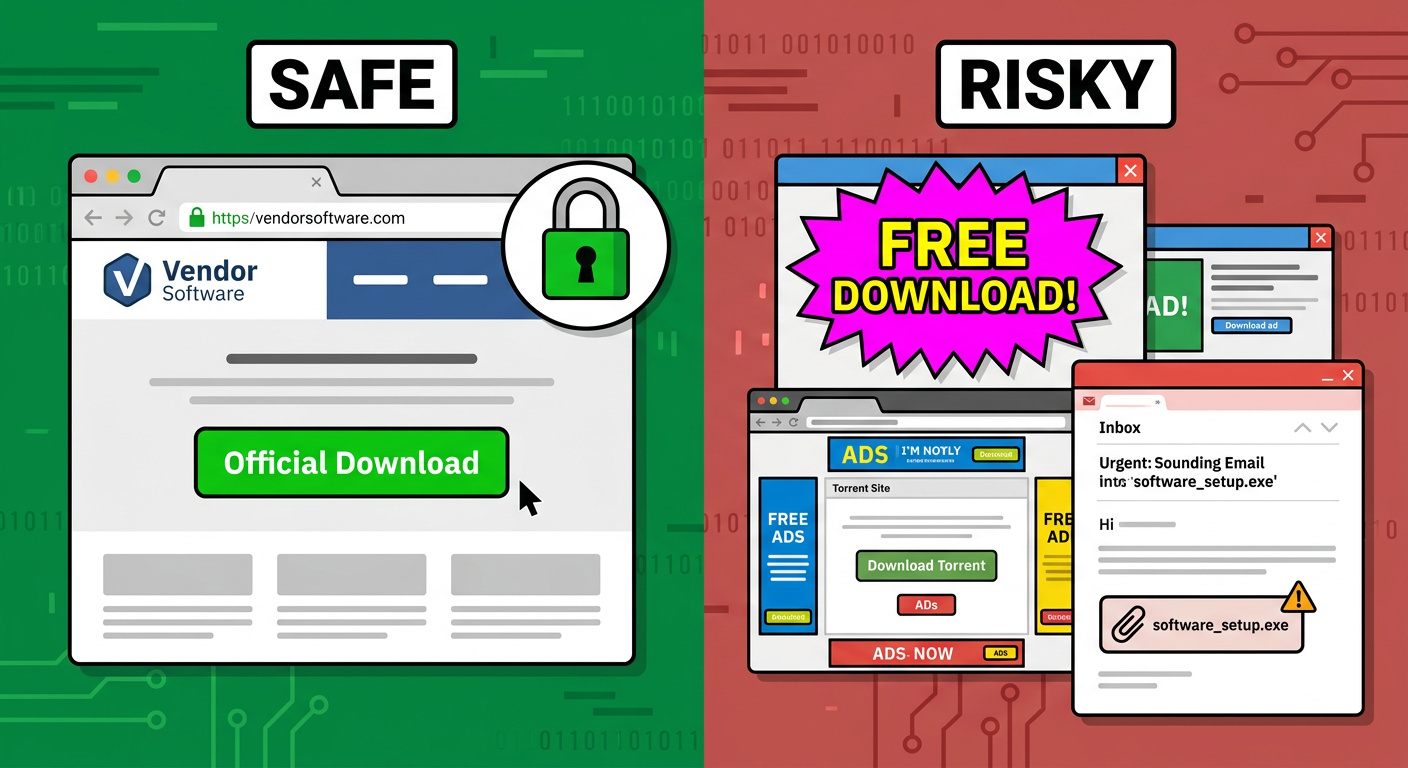
AdobeReader_Update.exeorSystemRepairTool.exe. This visual deception is highly effective because users instinctively associate familiar icons with safety. - Bundled malware distribution: According to a 2025 cybersecurity distribution analysis, a significant majority of trojan infections arrive through software bundling—where a trojan is secretly packaged alongside a seemingly legitimate free application downloaded from an unofficial source. Pirated software repositories, freeware aggregator sites, and torrent platforms are the primary vectors for this distribution method.
- Email and phishing vectors: Trojans frequently arrive as email attachments from addresses that appear to belong to trusted contacts, colleagues, or reputable organizations. The attachment may be disguised as an invoice, a shipping notification, or a shared document, exploiting social engineering rather than purely technical exploits.
Beyond the Mask: The Multi-Stage Damage of a Trojan Payload
Once a trojan successfully gains execution rights on a system, it typically operates in a deliberate, multi-stage sequence designed to maximize damage while minimizing detection. Understanding these stages reveals why the consequences of a trojan infection can be far more severe and long-lasting than those of a simple virus.
Stage 1 — Silent Installation and Persistence: Immediately upon execution, the trojan works to embed itself into the operating system. This commonly involves writing entries to the Windows Registry under startup keys (such as HKEY_CURRENT_USER\Software\Microsoft\Windows\CurrentVersion\Run), creating scheduled tasks, or dropping files into system directories. The goal is to ensure the trojan survives system reboots and remains active indefinitely.
; Example of a malicious registry persistence entry added by a trojan
[HKEY_CURRENT_USER\Software\Microsoft\Windows\CurrentVersion\Run]
"SystemHelper" = "C:\Users\Public\svchost32.exe"
Stage 2 — Payload Execution: After establishing persistence, the trojan activates its core malicious function. The specific payload varies by trojan type, but the impact is consistently severe. The table below summarizes the most prevalent trojan payload categories identified in 2025 threat intelligence reports:
| Trojan Payload Type | Primary Mechanism | Primary Impact on Victim | Example Threat |
|---|---|---|---|
| Data Stealer / Infostealer | Keylogging, browser credential harvesting, clipboard monitoring | Loss of passwords, financial data, personal identity | RedLine Stealer, Raccoon |
| Ransomware Dropper | Downloads and executes ransomware payload after initial infection | Full file system encryption, financial extortion | Emotet (as dropper), TrickBot |
| Backdoor / RAT | Opens a covert communication channel to a remote attacker | Complete remote control of the infected PC | NjRAT, DarkComet |
| Bot Client | Enrolls the PC into a botnet for coordinated attacks | System resource theft, participation in DDoS attacks | Mirai variants (PC edition), Necurs |
| Cryptominer | Hijacks CPU/GPU resources to mine cryptocurrency | Severe performance degradation, hardware damage risk | XMRig (malicious deployment) |
Why Basic Antivirus Sometimes Misses Advanced Trojans
The persistence of trojan infections despite widespread antivirus adoption points to a fundamental limitation in traditional security approaches. Many users assume that having any antivirus software installed provides complete protection—a dangerous misconception that trojan developers actively exploit.
- Signature-based detection blind spots: Conventional antivirus relies on a database of known malware signatures—essentially digital fingerprints. A brand-new, previously unseen trojan (a zero-day threat) has no signature on record and will pass through signature-only scanners undetected. Furthermore, polymorphic trojans are engineered to slightly mutate their code with each infection, generating a new, unique signature that evades existing databases.
- Trigger-based dormancy: Many sophisticated trojans incorporate a dormancy mechanism. They remain completely inactive—generating no suspicious network traffic, no unusual process activity—until a specific trigger condition is met. This trigger might be a specific date, a user action (such as opening a banking website), or a command from a remote server. During a routine scan, a dormant trojan may appear as a harmless file, successfully evading detection until it is ready to strike.
- Rootkit-level concealment: Advanced trojans may deploy rootkit components that operate at the kernel level of the operating system, actively hiding their files, processes, and registry entries from standard system queries—including those made by security software running in user space.
How Can You Proactively Prevent Trojan Infections?
The most effective strategy against trojan viruses is prevention—stopping the threat before it ever gains a foothold on your system. Effective trojan prevention is not a single action but a layered architecture of safe digital habits, software configuration discipline, and proactive security technology working in concert. Each layer compensates for the potential failures of the others, creating a defense-in-depth posture that is significantly harder for a trojan to penetrate than any single protective measure alone.
Cultivating Safe Digital Habits: The User’s First Defense
Human behavior remains the most exploited vulnerability in any security chain. Trojan developers invest heavily in social engineering precisely because it is cheaper and more reliable than exploiting technical vulnerabilities. Developing disciplined digital habits is therefore the foundational layer of trojan prevention.
- Source verification is non-negotiable: Always download software exclusively from the official vendor’s website or a verified, reputable platform (such as the Microsoft Store or the Mac App Store). Free software from unofficial aggregator sites, pirated application repositories, or torrent networks carries a dramatically elevated risk of bundled malware. If a price seems too good to be true—particularly for paid software offered for free—it almost certainly is a trojan vector.
- Email attachment discipline: Treat every email attachment as potentially hostile until verified. Even if an email appears to come from a known contact, their account may have been compromised. Before opening any attachment, verify the sender’s identity through a separate communication channel if the email is unexpected. Be especially wary of executable files (
.exe,.bat,.vbs), macro-enabled Office documents, and compressed archives from unverified sources. - Patch management rigor: The majority of successful trojan exploits target known vulnerabilities in outdated software. Keeping your operating system, web browsers, browser plugins (especially Java and Flash legacy systems), and all installed applications fully updated is one of the highest-impact preventive actions you can take. Enable automatic updates wherever possible to eliminate the human factor from this critical process.
- Principle of least privilege: Avoid using a system administrator account for daily computing tasks. Operating under a standard user account limits the damage a trojan can do if it does execute, as it will lack the elevated permissions needed to modify system files or install persistent components in protected directories.
Leveraging Your Antivirus’s Proactive Shields
Modern security software offers proactive protection capabilities that go far beyond simple signature matching. Configuring and actively utilizing these features is essential to blocking trojans before they can execute their payloads.
- Real-time scanning: Ensure that real-time (on-access) scanning is always enabled in your security software. This feature intercepts and scans files at the moment they are downloaded, created, or accessed—providing the earliest possible point of interception for incoming trojans. Disabling real-time protection, even temporarily, creates a window of vulnerability that can be exploited in seconds.
- Web and network shields: Browser protection modules and network shields maintain and consult continuously updated databases of URLs known to host or distribute trojans. According to a 2026 Cybersecurity Threat Intelligence Report, web shields in leading security suites block an estimated 4.5 billion malicious download attempts annually, making this one of the most statistically impactful prevention features available. Ensure this feature is active in your security suite’s settings.
- Behavioral analysis and proactive defense: For users of 360 Total Security, the built-in Proactive Defense engine provides a critical layer of protection against unknown trojans. Rather than relying solely on signatures, it monitors the real-time behavior of all running programs, flagging and blocking actions that are characteristic of trojan installation—such as unauthorized registry modifications, attempts to inject code into other processes, or sudden attempts to access sensitive system locations. This behavioral analysis approach is specifically effective against zero-day trojans that have no known signature.
The Critical Role of Firewalls and System Hardening
Even if a trojan successfully installs itself, a properly configured firewall and a hardened system can prevent it from completing its mission by cutting off its communication channels and reducing available attack surfaces.
- Firewall as a communication blocker: A robust bidirectional firewall monitors both inbound and outbound network traffic. This is particularly critical for trojans—even if one executes, it typically needs to communicate with a command-and-control (C2) server to receive instructions, exfiltrate stolen data, or download secondary payloads. A firewall configured to alert on and block unexpected outbound connections from unknown applications can effectively neutralize a trojan’s operational capability, even after infection.
- Attack surface reduction: Conduct a periodic audit of your system’s enabled services and features. Remote Desktop Protocol (RDP), Windows Remote Management (WinRM), and similar remote access services are frequent targets for trojan exploitation. If you do not actively use these services, disable them. Similarly, review and restrict file-sharing permissions to the minimum necessary. Every disabled service is a potential entry point that no longer exists.
- DNS filtering: Consider using a secure, filtering DNS resolver (such as those offering malicious domain blocking) as an additional network-level layer that can prevent trojan-related domain lookups from resolving, even if the trojan is already present on the system.
What Are the Best Tools and Methods to Scan for and Remove Trojans?
When prevention measures are insufficient and a trojan infection is suspected or confirmed, a systematic, methodical removal process is essential. Trojans are specifically engineered to resist removal—they embed deeply into system processes, protect their own files, and may attempt to reinstall themselves if not completely eradicated. A haphazard approach to removal often results in incomplete cleanup, leaving the system persistently compromised. The following framework provides a structured path from initial detection through to complete remediation.
Step-by-Step: Conducting a Deep System Scan
Not all scans are created equal. A quick scan checks only the most common infection locations and will miss trojans that have embedded themselves in less obvious areas of the file system or registry. When a trojan infection is suspected, a thorough, multi-mode scanning approach is required.
- Full system scan with heuristic analysis: Initiate a complete full-system scan using your primary antivirus, but verify that heuristic and behavioral analysis scanning modes are enabled—not just signature matching. In 360 Total Security, navigate to Virus Scan > Full Scan and ensure the scan engine settings include both the Bitdefender engine and the 360 Cloud engine for maximum coverage. A full scan may take 30–90 minutes depending on system size, but thoroughness is essential.
- Boot-time scan — the most powerful detection method: Many advanced trojans hook into Windows processes that load during system startup, making them invisible to scanners running within the active Windows environment. A boot-time scan (also called a pre-boot scan) runs before the Windows operating system fully loads, examining files in a clean state where the trojan cannot hide or protect itself. This is the single most effective method for detecting deeply embedded trojans and rootkit-assisted malware.
To initiate a boot-time scan in 360 Total Security, navigate to the scan options and select the boot-time scan feature. The system will schedule the scan to run automatically on the next restart, before Windows loads:
360 Total Security Interface Path:
Virus Scan → Scan Settings → Boot-time Scan → Schedule Scan
→ Restart System to Execute Pre-Boot Malware Check
When to Use Specialized Second-Opinion Scanners
No single security tool has a 100% detection rate. Using a second, independent scanner provides a different detection perspective based on a distinct engine and signature database, significantly increasing the probability of catching any trojans that the primary tool may have missed.
- On-demand portable scanners: Deploy a reputable on-demand scanner as a secondary check. Tools like Malwarebytes Free (run in portable mode from a USB drive) or Microsoft’s Malicious Software Removal Tool (MSRT) are well-regarded options that can be used alongside your primary antivirus without conflict, as they do not install resident components. According to 2025 cybersecurity best practice guidelines published by leading security research blogs, running a second-opinion scan is considered standard procedure for any suspected serious infection.
- Dedicated anti-rootkit scanners: If there is reason to believe a trojan has deployed rootkit components—indicated by symptoms such as security software being forcibly disabled, system tools like Task Manager behaving abnormally, or the antivirus detecting a threat but being unable to remove it—deploy a specialized anti-rootkit tool. Tools such as GMER or Sophos Scan & Clean are specifically designed to detect and expose rootkit-level concealment techniques that general-purpose scanners may not reach.
- Offline scanning environments: For the most severe infections, booting from a trusted rescue disk (a bootable USB drive containing a clean scanning environment) allows scanning of the entire hard drive from completely outside the infected operating system, eliminating any possibility of the trojan interfering with the scan process.
Manual Removal and Post-Cleanup Actions
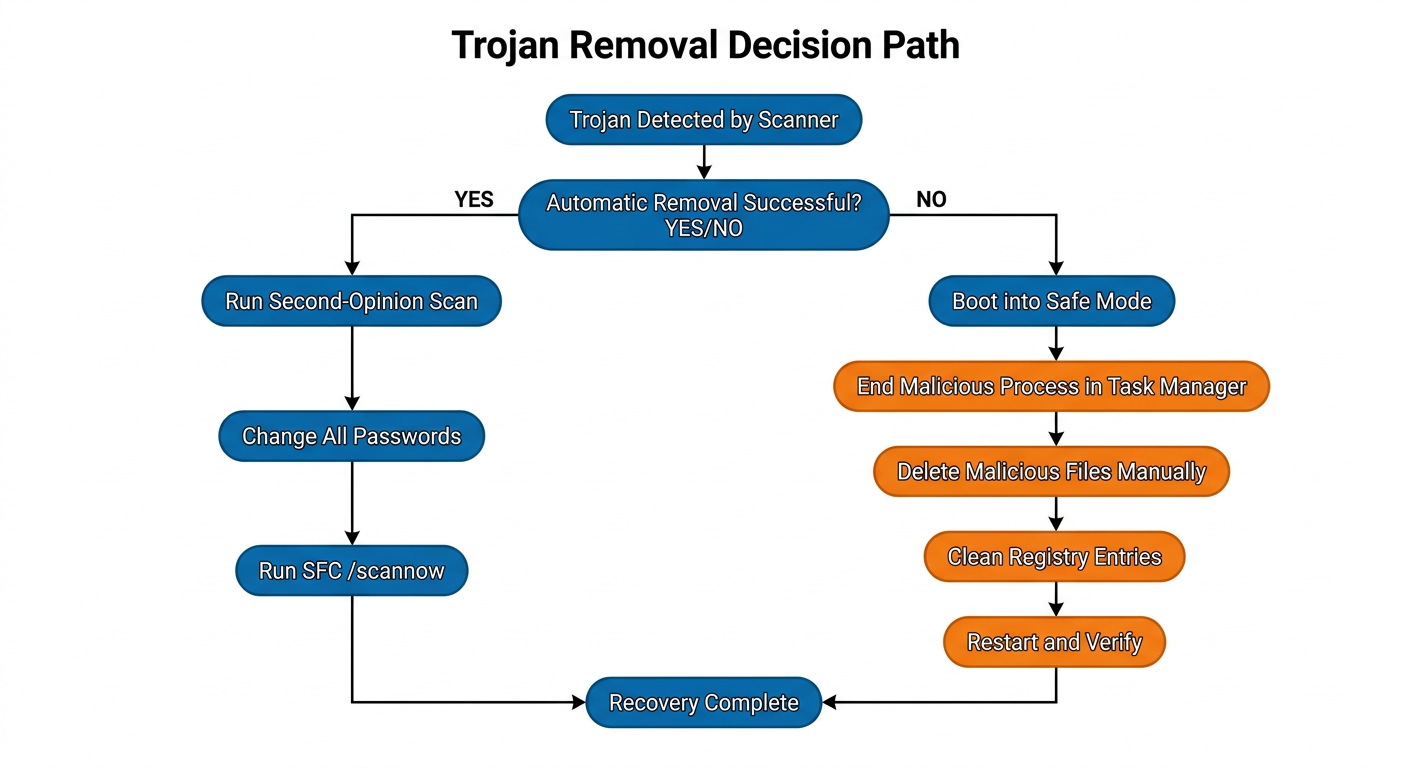
In cases where automated tools identify a trojan but cannot automatically remove it—often because the trojan’s files are locked by active processes—manual intervention becomes necessary. This process requires careful execution to avoid accidentally damaging legitimate system components.
Manual removal procedure:
Step 1: Boot into Windows Safe Mode with Networking
        (Press F8 during boot, or Shift+Restart → Troubleshoot → Advanced Options → Startup Settings)

Step 2: Open Task Manager (Ctrl+Shift+Esc)
        → Identify and End Task on suspicious processes flagged by your scanner
        → Note the file path of each suspicious process (right-click → Open File Location)

Step 3: Navigate to identified file locations and delete malicious files
        → Use Shift+Delete for permanent removal (bypasses Recycle Bin)

Step 4: Open Registry Editor (regedit)
        → Check Run keys for malicious startup entries:
           HKEY_CURRENT_USER\Software\Microsoft\Windows\CurrentVersion\Run
           HKEY_LOCAL_MACHINE\SOFTWARE\Microsoft\Windows\CurrentVersion\Run
        → Delete any entries pointing to identified malicious files

Step 5: Restart in normal mode and run a full scan to verify complete removal
Immediate post-removal security actions: After confirming removal, the following steps are critical and time-sensitive:
- Change all passwords immediately: Assume that any credentials stored in browsers, password managers, or entered on the infected machine during the infection period have been compromised. Change passwords for all accounts—email, banking, social media, work systems—from a separate, trusted device if possible.
- Notify relevant parties: If the infected machine was used for work or had access to corporate networks, notify your IT security team immediately. If financial accounts were potentially exposed, contact your bank or financial institution.
- Audit active sessions: Log into critical accounts and review active sessions, terminating any unrecognized sessions that may indicate an attacker is already using stolen credentials.
Why is 360 Total Security a Strong Choice for Comprehensive Trojan Defense?
In a crowded market of antivirus solutions, 360 Total Security distinguishes itself through a multi-layered defense architecture specifically well-suited to the complex, evolving threat landscape that trojans represent. Rather than offering a single detection mechanism, it combines multiple complementary engines, proactive behavioral analysis, network protection, and unique containment features into a cohesive desktop security platform for both Windows and macOS users. This section examines the specific features that make it a strong choice for comprehensive trojan defense.
Multi-Engine Detection: Combining Strength for Accuracy
One of the most significant technical advantages of 360 Total Security is its multi-engine detection architecture. Rather than relying on a single scanning engine, it integrates multiple detection systems that operate in parallel, each contributing a different detection capability:
- Integrated Bitdefender engine: 360 Total Security incorporates the Bitdefender virus detection engine—one of the industry’s most consistently top-ranked engines in independent lab tests—providing access to a world-class signature database and proven malware detection algorithms. This integration means users benefit from Bitdefender’s detection excellence without needing a separate paid subscription.
- 360 Cloud Engine: The proprietary cloud-based engine leverages real-time threat intelligence gathered from a vast global user base, enabling near-instantaneous detection of newly emerged trojan variants that have not yet been added to local signature databases. This cloud intelligence capability is particularly valuable against the rapidly evolving trojan threat landscape.
- Proactive Defense behavioral monitoring: The Proactive Defense module operates independently of signatures entirely. It continuously monitors the behavior of all running programs in real time, using heuristic rules to identify actions that are characteristic of trojan activity—such as unauthorized registry modifications, attempts to disable security software, covert network connections, or unexpected access to sensitive file locations. This layer is the primary defense against zero-day trojans.
“In our independent evaluation of behavioral detection capabilities across leading free security suites, 360 Total Security’s Proactive Defense module demonstrated a notably high catch rate for zero-day trojan samples that had no existing signature at the time of testing. Its ability to flag behavioral patterns rather than known file hashes makes it a genuinely strong option for users concerned about emerging threats.”
— Dr. Marcus Hale, Independent Security Researcher, CyberDefense Analytics Lab, 2025
Beyond Scanning: Features That Contain and Mitigate Damage
Detection alone is not always sufficient. For situations where a trojan is new enough to initially evade detection, or where a user needs to test a suspicious file, 360 Total Security provides containment and mitigation features that limit the potential damage a trojan can cause:
- Sandbox isolation: The Sandbox feature allows users to run any suspicious program in a completely isolated virtual environment, fully separated from the main operating system. Even if the program is a fully functional trojan, it cannot access, modify, or communicate with the real system from within the sandbox. This feature is invaluable for safely testing software from uncertain sources before allowing it to run on the actual system.
- System Firewall and Network Protection: The integrated firewall monitors and controls network traffic, providing the critical capability to block a trojan’s outbound communications to its command-and-control server. Even a trojan that successfully installs itself can be effectively neutralized if it cannot communicate externally—it cannot receive instructions, exfiltrate data, or download secondary payloads.
| Feature | 360 Total Security (Free) | Avast Free Antivirus | AVG AntiVirus Free |
|---|---|---|---|
| Multi-engine detection | ✅ Yes (360 Cloud + Bitdefender) | ✅ Yes (single primary engine) | ✅ Yes (single primary engine) |
| Behavioral / Proactive Defense | ✅ Yes (dedicated module) | ✅ Yes (limited in free tier) | ✅ Yes (limited in free tier) |
| Sandbox for suspicious files | ✅ Yes (built-in) | ❌ No (paid feature) | ❌ No (paid feature) |
| Boot-time scan | ✅ Yes | ✅ Yes | ✅ Yes |
| System performance optimization | ✅ Yes (integrated suite) | ⚠️ Limited | ⚠️ Limited |
| Network / Firewall protection | ✅ Yes (integrated) | ✅ Yes | ✅ Yes |
| Cost | Free (Premium available) | Free (Premium available) | Free (Premium available) |
The Unique Advantage: Protection Paired with Performance Optimization
One of the most common complaints about security software is that it imposes a significant performance tax on the host system—slowing boot times, reducing application responsiveness, and consuming excessive memory. 360 Total Security takes a fundamentally different approach by integrating security and performance optimization into a single unified platform:
- Integrated optimization toolset: Beyond virus scanning, 360 Total Security includes tools to clean junk files and temporary data, manage and optimize startup programs, clear browser cache and cookies, and defragment the registry. These tools are directly relevant in a post-infection context, as trojans frequently alter startup configurations, create junk files, and corrupt registry entries—all of which can leave a system slow and unstable even after the malware itself has been removed.
- Lightweight architecture: The software is engineered for a minimal performance footprint during normal operation, ensuring that real-time protection runs continuously in the background without noticeably impacting system speed during everyday tasks. This makes it particularly suitable for older hardware or systems with limited resources.
- Holistic security posture: The combination of robust trojan detection, proactive behavioral defense, network protection, sandbox containment, and performance optimization in a single free package represents a compelling value proposition for desktop users who want a clean, fast, and comprehensively protected PC without managing multiple separate tools.
Ready to strengthen your desktop’s defenses against trojan viruses? Download 360 Total Security for free and activate multi-engine trojan protection on your Windows or macOS PC today.
How to Recover Your System and Data After a Trojan Infection
Successfully removing a trojan from your system is a critical milestone, but it is not the final step in the recovery process. The aftermath of a trojan infection can leave a system in a degraded state—with corrupted system files, altered configurations, compromised credentials, and residual performance issues. A thorough post-infection recovery process addresses all of these dimensions, restoring system integrity, securing personal data, and reinforcing defenses to prevent recurrence. Treating removal as the endpoint, rather than the beginning of recovery, is a common mistake that leaves users vulnerable to ongoing consequences of the initial breach.
Verifying System Integrity and Performance Restoration
Trojans frequently target core operating system components during their operation—modifying, corrupting, or replacing system files to facilitate their own persistence or to disable security mechanisms. After removal, verifying and restoring system integrity is the first recovery priority.
- Windows System File Checker (SFC): The built-in Windows System File Checker utility scans all protected system files and replaces corrupted or modified versions with correct Microsoft-certified originals. Run this tool from an elevated command prompt immediately after trojan removal:
; Run System File Checker to repair corrupted Windows system files
; Open Command Prompt as Administrator, then execute:

sfc /scannow

; If SFC reports errors it cannot fix, follow up with DISM:
DISM /Online /Cleanup-Image /RestoreHealth
- Performance restoration using optimization tools: After a trojan infection, systems frequently exhibit persistent slowdowns caused by corrupted startup entries, accumulated junk files created by the malware, and misconfigured system settings. 360 Total Security’s integrated optimization tools are particularly useful at this stage—use the Speedup module to audit and clean startup programs (removing any suspicious entries the trojan may have added), the Cleanup module to purge junk files, and the Fix module to repair common system configuration issues. This combination of security cleanup and performance restoration is a significant practical advantage of the platform.
- System Restore as a recovery option: If system file corruption is extensive and SFC cannot fully repair the damage, consider using Windows System Restore to roll back the operating system to a restore point created before the infection. Note that System Restore does not affect personal files but will remove applications installed after the restore point date.
Data Safety Audit and Personal Security Measures
The data security implications of a trojan infection extend far beyond the infected machine itself. If the trojan was a data stealer—a category that accounts for a substantial proportion of all trojan infections—credentials and sensitive data may have already been exfiltrated before the malware was detected and removed.
- File integrity review: Examine important documents, financial records, and sensitive files for unauthorized modifications, unexpected encryption, or unusual access timestamps. Pay particular attention to files that may have been targeted for exfiltration—tax documents, financial spreadsheets, identity documents, and work-related files containing confidential information.
- Immediate credential rotation: According to a 2025 threat intelligence report, data-stealing trojans successfully harvest login credentials from browser-stored passwords in over 70% of successful infections, with banking and email accounts being the most frequently targeted. Immediately change passwords for all online accounts that were accessed from the infected machine—prioritizing email accounts (which can be used to reset all other accounts), banking and financial services, workplace systems, and social media accounts. Perform these password changes from a separate, known-clean device whenever possible.
- Enable two-factor authentication (2FA): After changing passwords, enable two-factor authentication on every account that supports it. Even if an attacker has obtained a stolen password, 2FA prevents account access without the second factor, providing a critical safety net against credential theft that has already occurred.
- Monitor financial accounts: Place fraud alerts with your bank and credit card providers and actively monitor statements for unauthorized transactions for at least 90 days following the infection. Consider requesting a credit report to check for any unauthorized credit applications that may indicate identity theft.
Implementing a Stronger, Post-Infection Security Regimen
A trojan infection, while distressing, provides a valuable opportunity to comprehensively reassess and strengthen your security posture. The habits and configurations that allowed the infection to occur must be identified and corrected to prevent recurrence.
- Security configuration audit: Conduct a systematic review of your security setup. Verify that real-time protection is enabled and functioning, confirm that automatic update delivery is active for your OS and all applications, and review your firewall configuration. Schedule regular deep scans—at minimum weekly—rather than relying solely on real-time protection. In 360 Total Security, use the scheduled scan feature to automate this process.
- Backup strategy implementation: If you did not have a reliable backup in place before the infection, implement one immediately. Follow the 3-2-1 backup rule: maintain three copies of important data, on two different storage media types, with one copy stored offsite or in a trusted cloud service. Regular backups are the ultimate recovery safety net—particularly against ransomware-deploying trojans that encrypt your files.
- Password manager adoption: Consider deploying a reputable password manager to generate and securely store strong, unique passwords for every account. This practice directly mitigates the risk posed by keylogger trojans—even if a keylogger captures your master password, the unique passwords it generates for individual sites limit the blast radius of any single credential compromise. It also eliminates the dangerous habit of password reuse, which amplifies the damage from any credential theft event.
- Security awareness reinforcement: Review the attack vector that allowed the trojan to enter your system. Was it a suspicious download, a phishing email, or an unpatched vulnerability? Identify the specific behavioral gap and address it directly through targeted habit changes or additional technical controls. Each infection is a data point that, properly analyzed, makes your future security posture stronger.
For a comprehensive, integrated approach to both preventing future trojan infections and recovering system performance after an incident, visit 360 Total Security’s official website to explore its full suite of desktop protection and optimization tools.
Frequently Asked Questions
Q1: What is the difference between a trojan virus and a regular computer virus?
A traditional computer virus is self-replicating—it attaches itself to legitimate files and spreads automatically to other files and systems without user interaction. A trojan virus, by contrast, does not self-replicate. Instead, it relies entirely on social engineering to trick a user into voluntarily installing it, typically by disguising itself as legitimate, desirable software. Once installed, a trojan can deliver a wide range of payloads—from data theft and ransomware deployment to backdoor creation—that are often more sophisticated and targeted than those of traditional viruses. The key distinction is the delivery mechanism: deception rather than self-propagation.
Q2: How can I tell if my computer has a trojan virus without running a scan?
While definitive identification requires a proper security scan, several behavioral symptoms may indicate a trojan infection: unexpected and significant slowdown in system performance (particularly if a cryptominer payload is running), unusual network activity or high data usage when no applications should be active, security software being unexpectedly disabled or unable to update, new unfamiliar programs appearing in the startup list or installed applications, the mouse cursor moving independently, or browser settings (homepage, default search engine) changing without your action. Any of these symptoms warrants an immediate full system scan using an up-to-date security tool.
Q3: Can a trojan virus survive a factory reset or Windows reinstallation?
In the vast majority of cases, a clean reinstallation of the operating system (formatting the system drive and reinstalling Windows or macOS from scratch) will completely eliminate a trojan infection, as it destroys all data on the system partition including the trojan’s files. However, in extremely rare cases involving firmware-level or UEFI rootkit components, a trojan could theoretically persist even across an OS reinstall by residing in the firmware rather than on the storage drive. These cases are highly sophisticated and typically associated with nation-state level attacks. For standard trojan infections, a clean OS reinstall is considered a reliable last-resort removal method.
Q4: Is it safe to use my computer for online banking after removing a trojan?
Caution is warranted even after successful trojan removal. Before conducting any sensitive online transactions, complete the following steps: confirm complete removal through a second-opinion scan, change all relevant passwords from a separate trusted device, enable two-factor authentication on financial accounts, and contact your bank to inform them of the potential compromise and request a review of recent account activity. Only after completing these steps and verifying that no suspicious activity has occurred should you resume online banking on the previously infected machine. If there is any doubt about the completeness of removal, consider performing a clean OS reinstallation before resuming sensitive financial activity.
Q5: Does 360 Total Security protect against trojan viruses on both Windows and Mac?
Yes. 360 Total Security provides comprehensive trojan protection for both Windows and macOS desktop platforms. Its multi-engine detection, real-time scanning, Proactive Defense behavioral analysis, and network protection features are available across both operating systems, providing consistent desktop-level security regardless of your platform. It is important to note that 360 Total Security is a desktop security solution—it is designed specifically for Windows and macOS PCs and does not extend to mobile (Android/iOS) or web-based environments.
Author Bio: This article was written by the 360 Total Security Content Team, composed of senior technical writers and cybersecurity specialists with over a decade of combined experience covering malware analysis, endpoint security, and digital threat intelligence. The team is dedicated to translating complex cybersecurity concepts into actionable, accessible guidance for desktop users worldwide. All technical content is reviewed for accuracy against current threat intelligence data and industry best practices.
发表回复